The AI AdoptionFree AI pre-audit

AI agent or automation:
which one does the job?

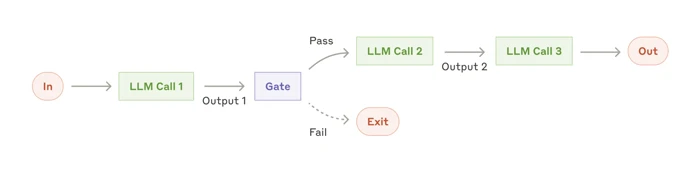
WorkflowThe path is written before it runs

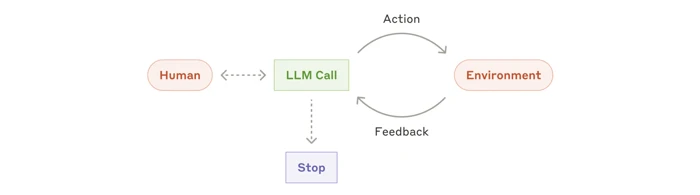
AgentThe AI picks its next step as it goes

Two diagrams from Anthropic’s guide Building effective agents.

An automation follows steps someone wrote before it starts: when a job is paid, mark it as paid and send the receipt. An AI agent is given a goal and a set of tools, and decides its next step from what it finds. Anthropic, n8n and Make give the same advice on their own pages: keep the agent for the part of the work nobody can write down step by step.

By The AI Adoption · Published on 15 November 2026 · Sources: the pages of Anthropic, n8n, Make and Microsoft, read on 15 November 2026

AnthropicBuilding effective agents

What sets an agent apart from an automation

Anthropic, the company behind Claude, draws the line in its guide to building agents. In a workflow, the AI model and the tools run through paths written in advance. An agent directs its own process: it chooses which tool to use and what to do next, until the task is done or it needs a person.

The same guide advises starting with the simplest thing that works, which can mean building no agent at all. A workflow gives a predictable, consistent result on a task that is well defined. An agent is for open-ended work, where nobody can say in advance how many steps it will take.

We recommend finding the simplest solution possible, and only increasing complexity when needed.

From Anthropic’s guide to building agents

n8nAI agents page

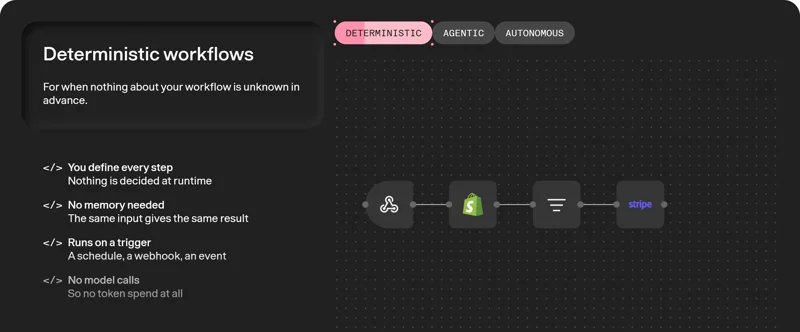
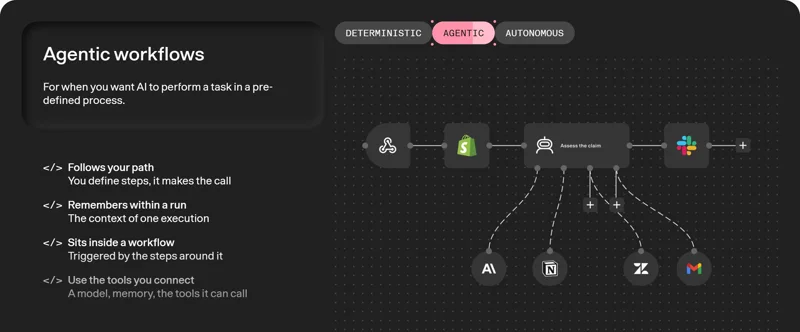
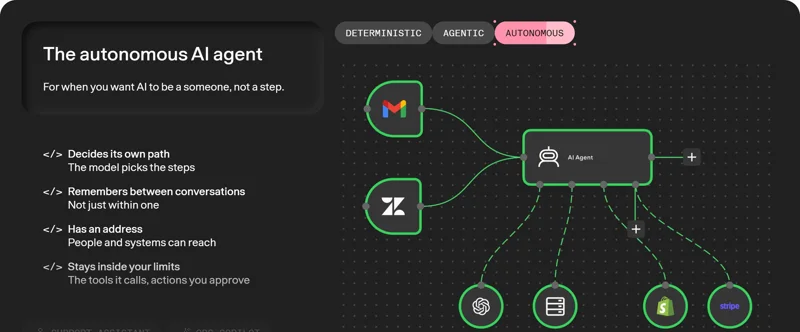
n8n shows three settings between automation and agent

n8n, an automation tool, shows the choice as a dial with three settings. Its rule is that the less of the process you can define, the more agent you need.

A deterministic workflow is for work where nothing is unknown in advance. You define every step, and a schedule or an event starts it. It makes no call to an AI model, so the same input gives the same result. n8n’s examples are a nightly report, an order sync and lead routing.

An agentic workflow puts AI at one step of a set process. You define the steps and the AI makes the call where judgement is needed, such as tagging an email or summarising data. An autonomous agent picks its own steps and remembers between conversations, inside the limits you set: the tools it may call and the actions you approve.

The three settings on n8n’s AI agents page, captured on 15 November 2026.

Can someone write down every step today?

Make answers the question in its own FAQ: use an agent when the work needs judgement or reasoning, especially with unstructured input like text, messages or documents. Its short version is “If it just needs doing, use automation.”

Microsoft makes the same split in Copilot Studio. Its agent flows follow a rule-based path, and the same input always produces the same output. An agent can call one of these flows as a tool when it needs that fixed job done.

Steps you can write down

  • Send last week’s figures every Monday
  • Copy a paid order into the accounts
  • Pass a new enquiry to the right person by postcode

Steps that need judgement

  • Read an email that could be about anything
  • Answer a question from your own documents
  • Work out what a customer wants and draft the reply

Most tasks mix the two

The vendors describe the two working together. In n8n, the workflow does the fixed steps and the agent adds judgement on top. An agent can also call a workflow as one of its tools. Make says its agents work alongside fixed logic, in the same flow.

Take a customer who emails to move a booking. Most of the work is fixed steps. One step needs reading and deciding, and a person checks the reply before it goes out. Our AI workflow example shows one such task from start to finish.

  1. AutomationThe email arrives and the workflow finds the customer’s booking.
  2. AI stepThe AI reads the email, works out what the customer wants and drafts the reply.
  3. PersonSomeone on the team reads the draft and approves it.
  4. AutomationThe reply goes out and the booking is updated.
Our example, with one step for the AI.

What an agent needs before it runs

An agent decides from what it can read. If your rules, your documents and who does what are not written down anywhere it can reach, it decides without them. That work comes first, and our guide to making business information accessible to your team shows what to gather.

Then come its limits. In n8n, you set the tools an agent can reach and the actions that need a human. Make lets you add manual approvals or stop the agent at set points. Its Reasoning panel shows every decision the agent makes. Anthropic’s guide adds that an agent can pause for a person at checkpoints, and advises testing it in a safe environment first.

Set the tools an agent can reach and actions that need a human.

From n8n’s AI agents page

  • It knows your rules, your documents and who does what.
  • It reaches only the tools and accounts you connect.
  • It stops for a person before the actions you choose.
  • It leaves a record of each decision your team can read.

Speed, running cost and mistakes

Anthropic says agents often trade speed and running cost for better results. Because they act on their own, they cost more to run, and a mistake made early can carry through the steps after it.

A workflow with no AI step makes no call to a model and runs the same way every time. When the fixed steps run as a plain automation, the agent only works on the step that needs judgement, and so do its checks.

The autonomous nature of agents means higher costs, and the potential for compounding errors.

From Anthropic’s guide to building agents

A plain automation

  • You write every step before it runs.
  • A schedule, a webhook or an event starts it.
  • The same input gives the same result.
  • It makes no call to an AI model.

An AI agent

  • It picks its next step from what it finds.
  • It handles text, messages and documents that need judgement.
  • It is slower and costs more to run.
  • A mistake made early can carry through the steps after it.

Questions to ask before you choose

  • Can someone write down every step today? Then it is an automation, and it needs no AI.
  • Does one step need someone to read and decide? That step can be an AI step inside the workflow.
  • Is the work open-ended, with no set number of steps? That is the work Anthropic describes agents for.
  • What may it send or change without a person? Set that in the tool before it runs.
  • Where will your team see what it did? Choose a set-up that records each decision, step by step.

How we start

We work in Claude and set it up for the businesses we work with. When a team already works in another AI environment, we start from the account it has. Before we build anything, we write the task down with the person who does it today. We mark the steps that never change and the one step that needs judgement.

The fixed steps become an automation and the AI goes on that one step. A person approves what goes out. Our guide to handing a repetitive task to AI with a person’s approval shows that set-up, and our comparison of Zapier, Make and n8n covers the automation tools.

How we help, who we are, how we handle security and what an AI adoption consultant does. On the same subject: AI agents for business, which one should yours use.

The first step with us is a free AI pre-audit

45 minutes to explore where AI could help your business and what to put in place first. With or without us.

Book your free AI pre-audit

Sources

Every fact on this page comes from the vendors’ own pages, read on 15 November 2026. Anthropic’s guide was published on 19 December 2024, and Anthropic notes that the tools have changed since. The page uses only its definitions and its advice. The n8n screens come from its AI agents page, captured the same day. Vendors change their products and their pages often, so check the current page before you decide.

  1. Anthropic: Building effective agents, 19 December 2024
  2. n8n: AI agents
  3. Make: Make AI Agents
  4. Microsoft Learn: agent flows in Copilot Studio, updated 12 November 2026

Bring your questions.

Free AI pre-audit