Find last week’s quotes with no reply, draft a follow-up for each, and send nothing before someone has read it.
Inside the AI assistant your team uses
Claude
Copilot
Workspace Studio
ChatGPT
Starts
When you ask it, or on a schedule you set
Works on
Your email, files and apps, through the connections you allow
Comes back to you
With a plan or an action to approve, depending on the product
Inside an automation tool
Zapier
Make
n8n
Starts
On a trigger: every Monday, or when an email arrives
Works on
The apps and credentials connected to that workflow, step after step
Comes back to you
At the approval step you add to the workflow
Inside your business software
HubSpot
Salesforce
Zendesk
Starts
Inside the application, on its own records
Works on
The quotes, contacts and deals already held in that software
Comes back to you
Hands the case to a person when it needs one
Our example task, with each vendor’s own logo and product name. Google presents Workspace Studio’s agents as built on Gemini, whose mark stands for it here.
Most lists of the best AI agents rank five to ten products by the job they do, and several are written by a vendor that puts its own product first. For a business, the agent that fits depends on three things: where it works, what it can reach and when it stops for a person. This page compares the agents you meet in three places, inside the AI assistant your team already uses, inside an automation tool and inside your business software, from each vendor’s own pages.
By The AI Adoption · Published on 18 October 2026 · Sources: the vendors’ own pages, read on 18 October 2026
What an AI agent is
An agent is AI that carries out a task over several steps, in other apps, instead of only answering in a chat: it reads an email, looks up a record, drafts a reply or files a document. Every vendor on this page uses the word, and each one gives its agent a different place to work and a different set of things it can reach and change.
The lists that rank agents are often behind the products. OpenAI’s help centre says ChatGPT agent is no longer available and points to ChatGPT Work for multi-step tasks; Operator, which some lists still recommend, had been folded into ChatGPT agent, and its website is no longer accessible. Zapier is moving its Agents product into a step of its workflow editor called AI by Zapier, without a date yet for turning the old product off.
Agents inside the AI assistant you already use
If your team already works in Claude, Microsoft 365 Copilot, Google Workspace or ChatGPT, the agent comes inside it. It starts when someone asks or on a schedule, and it works on the email, files and apps the account is connected to, which is why the setup of that account decides most of what the agent can do.
Claude CoworkAnthropic
The Claude app: desktop, web and mobile
Slack, through Claude Tag
Before it acts
By default, Claude asks first. Tools that write through a connector are approved task by task unless an owner allows them for all tasks.
Who controls it
On Team and Enterprise plans it is on by default, and an owner can turn it off.
Copilot CoworkMicrosoft 365 Copilot
Outlook
Teams
Excel
and the rest of Microsoft 365
Before it acts
A plan with checkpoints; you approve its changes before they are applied.
Who controls it
Your Microsoft 365 identity, permissions and compliance policies apply by default; actions are auditable.
Workspace StudioGoogle Workspace, with Gemini
Gmail
Drive
Chat
other apps in limited preview
Before it acts
Not described in the Google announcement and help pages read for this article.
Who controls it
A Workspace account with access to Gemini, through your administrator; not on mobile.
ChatGPT WorkOpenAI
More than 1,400 plugins
A browser built into the desktop app
Before it acts
In Plan mode, you approve a step-by-step plan before the work begins.
Who controls it
Your plan: the desktop app on every plan; web and mobile on Plus, Pro, Business, Enterprise and Edu.
Each line from the vendor’s own pages, read on 18 October 2026. No price and no ranking.
In Claude, the agent is Claude Cowork, available on the paid plans. By default Claude asks before taking an action, and you can let it keep working and check in only when something needs a closer look; a task can also be scheduled, for example every Monday. On Team and Enterprise plans an owner can turn Cowork off, can stop members from switching to automatic approval, and decides whether tools that write through a connector can be allowed for all tasks, which is off by default. In Slack, Claude Tag, in beta for Team and Enterprise, joins channels as a member of the team: administrators decide which tools and information it uses in which channels, and see a log of everything it has done and who asked for it.
In Microsoft 365, Copilot Cowork takes an outcome you describe, works from your emails, meetings, messages and files across Outlook, Teams and Excel, and turns the request into a plan with checkpoints. It shows the actions it recommends, and you approve the changes before they are applied. Microsoft says identity, permissions and compliance policies apply by default, that actions are auditable, and that Cowork integrates the technology behind Claude Cowork, in work with Anthropic. Autopilot, which Microsoft announced on 25 September for a private preview, is a persistent agent with its own identity in Teams and Outlook that runs recurring work within the objective and boundaries you set.
In Google Workspace, agents are built in Workspace Studio by describing the task in plain language or starting from a template, and they work across Gmail, Drive and Chat. Google’s example is an agent that labels every email containing a question for you as To respond and pings you in Chat. Agents can be shared like a Drive file; connections to apps outside Google, such as Asana, Jira, Mailchimp and Salesforce, are listed as a limited preview in Google’s help centre, and Studio needs a Workspace account with access to Gemini.
In ChatGPT, OpenAI now sends multi-step work to ChatGPT Work: one-time or recurring tasks, team tasks that use approved company tools, and more than 1,400 plugins. In Plan mode, ChatGPT gathers context, asks questions and writes a step-by-step plan, which you approve before the work begins. Our comparison of ChatGPT and Claude for a business sets out where each keeps a company’s rules and documents.
Agents inside an automation tool
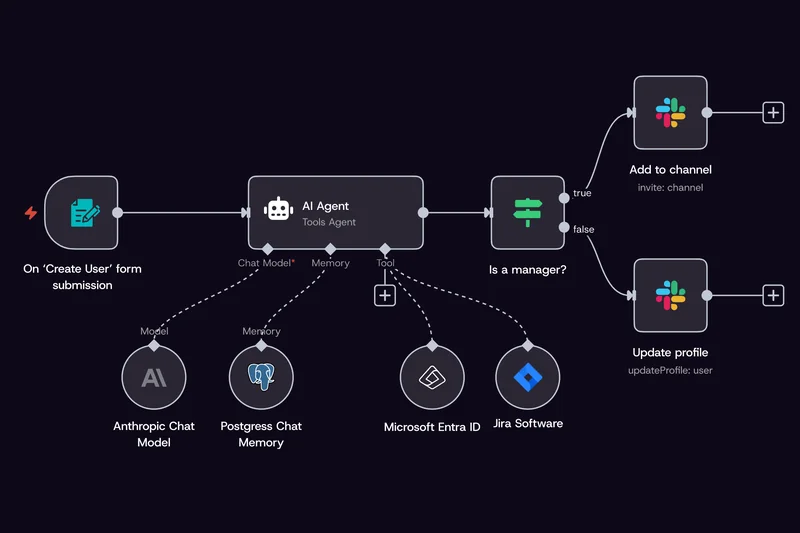
Zapier, Make and n8n add an agent to the workflows they already run. The workflow starts on a trigger, such as every Monday or a new email, and follows the steps you set, and the agent is the step inside it that reads, decides and writes. That makes its reach easy to state: n8n describes it as the workflows and scoped credentials you handed it.
An agent as one step of a workflow, in n8n. Capture from the n8n home page, 4 October 2026.
Each tool handles approval in its own way. In AI by Zapier, each tool can be set to require approval before it runs, and by default the tools run without pausing. Make lets you add manual approvals or stop the agent at specific points, and shows each decision it takes in a Reasoning panel. In n8n, sensitive tools pause for a person’s approval before they run, and the agents run on n8n’s cloud or on your own server. Our comparison of Zapier, Make and n8n covers how the three differ beyond their agents.
Agents inside your business software
Business applications now come with their own agents, which work on the records already held there. HubSpot’s Breeze agents answer customers, research prospects and draft outreach from what is already in the CRM, and HubSpot says you set the guardrails they work inside. Zendesk’s AI agents resolve service enquiries across messaging, email and voice, from the help centre and sources such as Google Drive or PDFs, and route an issue to the right team with its full context. Salesforce’s Agentforce answers questions and takes actions from Salesforce CRM data and Data 360, and escalates to a person when a case is beyond it.
The question to ask of each is what it can reach beyond its own application. Zendesk connects its agents to outside sources and to your tools and systems, while HubSpot builds its agents on the CRM. For a task that runs across several systems, such as a quote recorded in the CRM, the email that sent it and the invoice in the accounts, the agent has to be able to reach each of them, or the task belongs in the assistant or the automation tool that already does.
Where a person approves
The setting that matters most is the moment the agent stops for a person. The vendors describe it in different terms and with different defaults, and the figure below sets them side by side, in each vendor’s own words.
Before the agent acts, in each vendor’s words
Asks before acting
You add the stop
Not described in the pages read
Claude CoworkAsks first, by default
“By default, Claude asks before taking an action.”
A member can switch to automatic approval, unless an owner turns that mode off; tools that write through a connector stay approved task by task unless an owner allows them for all tasks.
Copilot CoworkAsks before applying
“You can see any actions that it is recommending, then approve changes before they are applied.”
Checkpoints let you confirm progress, make changes or pause the work at any time.
n8nAsks before sensitive tools
“Sensitive tools pause for human approval before they run.”
n8n also lists manual approval steps among its safeguards.
ChatGPT WorkYou add the stop
In Plan mode, ChatGPT writes a step-by-step plan, and you suggest changes or approve it to start the work.
OpenAI’s page does not say whether Plan mode is the default.
AI by ZapierYou add the stop
“By default, your tools run without pausing for confirmation.”
Turn on Require approval before running, tool by tool.
Make AI AgentsYou add the stop
You can add manual approvals, or stop the agent at specific points.
Make’s page does not say whether an approval is set by default.
Workspace StudioNot described
Google’s announcement and help pages read for this article do not describe an approval step before an agent acts.
Quotations from each vendor’s page, read on 18 October 2026. HubSpot, Zendesk and Salesforce describe a handover to a person rather than an approval setting.
With the businesses we work with, we decide the level of autonomy task by task: some tasks stay as a draft that a person sends, others run on their own within written limits and send the uncertain cases to a person. Approval before a payment or a message to a customer is the case we set out in handing a repetitive task to AI, and what each role may read and change is covered in adopting AI securely.
The questions that decide it
No product on this page is the best AI agent for every business. These are the questions that decide which one fits yours.
Where does your team already work? If your email and files are in Microsoft 365 or Google Workspace, an agent inside that suite starts with access to them; an agent anywhere else needs a connection to each of them.
Does the task repeat with the same steps? A task that runs the same way every week is what an automation tool is built for; a task that needs judgement on documents that vary is where an assistant does the work.
What may the agent read and change? Write down the mailboxes, folders and records the task needs, and give the agent those and nothing more.
Where must it stop for a person? Decide which actions need someone’s approval, then check the product’s default against that list: some ask before acting, others run until you add the stop.
Who switches it on? Some agents are on by default for every member of the account, others wait for the administrator; check which, and who in your company holds that role.
Where we stand, and how we start
We work in Claude and set it up for the businesses we work with; when a team already works in another AI environment, we start from the account it has. Before anything is built, we look at the task, the tools it touches and the point where a person approves, and we pick the place where the agent should work from there.
If you want to talk through which agent fits your business, the first step with us is a free AI pre-audit: 45 minutes on a call about how you and your team use AI today and which work to hand over first. You leave with a clear next step, with or without us.
Every fact on this page comes from the vendor’s own page, read on 18 October 2026, except the n8n capture, taken on 4 October 2026. Vendors change their products and their pages often; check the current page before you decide.
 The AI AdoptionFree AI pre-audit
  Claude
 Copilot
 Workspace Studio
 ChatGPT
 Zapier
 Make
Make n8n
n8n HubSpot
 Salesforce
 Zendesk
 Slack, through Claude Tag
 Outlook
 Teams
Teams Excel
Excel Gmail
Gmail Drive
Drive Chat
Chat